

Masked Aadhaar

Masked Aadhaar: hide your Aadhaar number before you share

Before a copy of your Aadhaar goes to a hotel, a SIM shop or an office, BharatScanner blacks out the first 8 digits and the QR code, like UIDAI's masked Aadhaar. The number is found and hidden on your phone, and only when you ask.

Get it on Google Play
  • Free, no sign-up
  • Android 7 and up
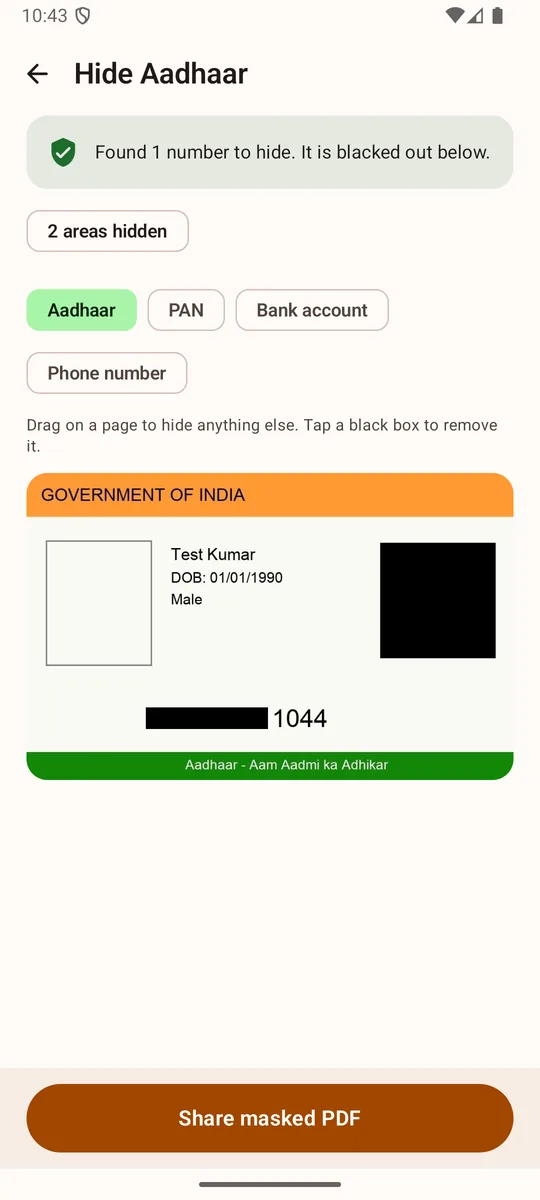
Hide Aadhaar in BharatScanner: found 1 number to hide, blacked out on a specimen card, with PAN, bank account and phone number options

How to mask your Aadhaar

  1. Scan the card

    Scan your Aadhaar with ID card, both sides on one page, or share a photo or PDF of it to BharatScanner.

  2. Open Hide Aadhaar

    Go to Tools › Hide Aadhaar and pick the document. It finds the 12-digit number and blacks out the first 8 digits and the QR code. A 16-digit VID is cut to its last 4 digits.

  3. Hide anything else

    Tap PAN, Bank account or Phone number to hide those too, or drag on the page to black out anything by hand. Tap a black box to remove it.

  4. Share the masked copy

    Tap Share masked PDF. It's a new PDF, and your document stays as it was.

Really hidden, not just covered

  • The black boxes are painted into the page, and the hidden digits are left out of the PDF's text, so they can't be copied out from under a box.
  • In Word, Excel and text files, only the last 4 digits stay.

Or every time you share

  • Turn on Hide Aadhaar when sharing in Settings, and sharing, Send to computer and the PDF tools hide the number by themselves. It's off until you turn it on.

Questions

Good to know.

What is a masked Aadhaar?

A copy of your Aadhaar with the first 8 digits of the number hidden, so only the last 4 show, like the masked Aadhaar UIDAI lets you download.

Is my Aadhaar uploaded?

No. The number is found by reading the page on your phone, and the masked PDF is made there too.

Can I mask an Aadhaar PDF someone sent me?

Yes. Share the PDF to BharatScanner, then open it in Hide Aadhaar.

Get BharatScanner. It's free.

Scan, size, sign and share every paper in your life, on your phone. Made in India.

Get it on Google Play